How reports work
Setup → Reports (or Manager → Administrative → Reports). Pick a report, pick a date range (quick chips: today / yesterday / this week / this month / last month), and every report prints or exports to CSV with one tap — no report writer, no license module.
All reports read straight from the sale tables: nothing is "posted" or batched, so a report run ten seconds after a sale includes it.
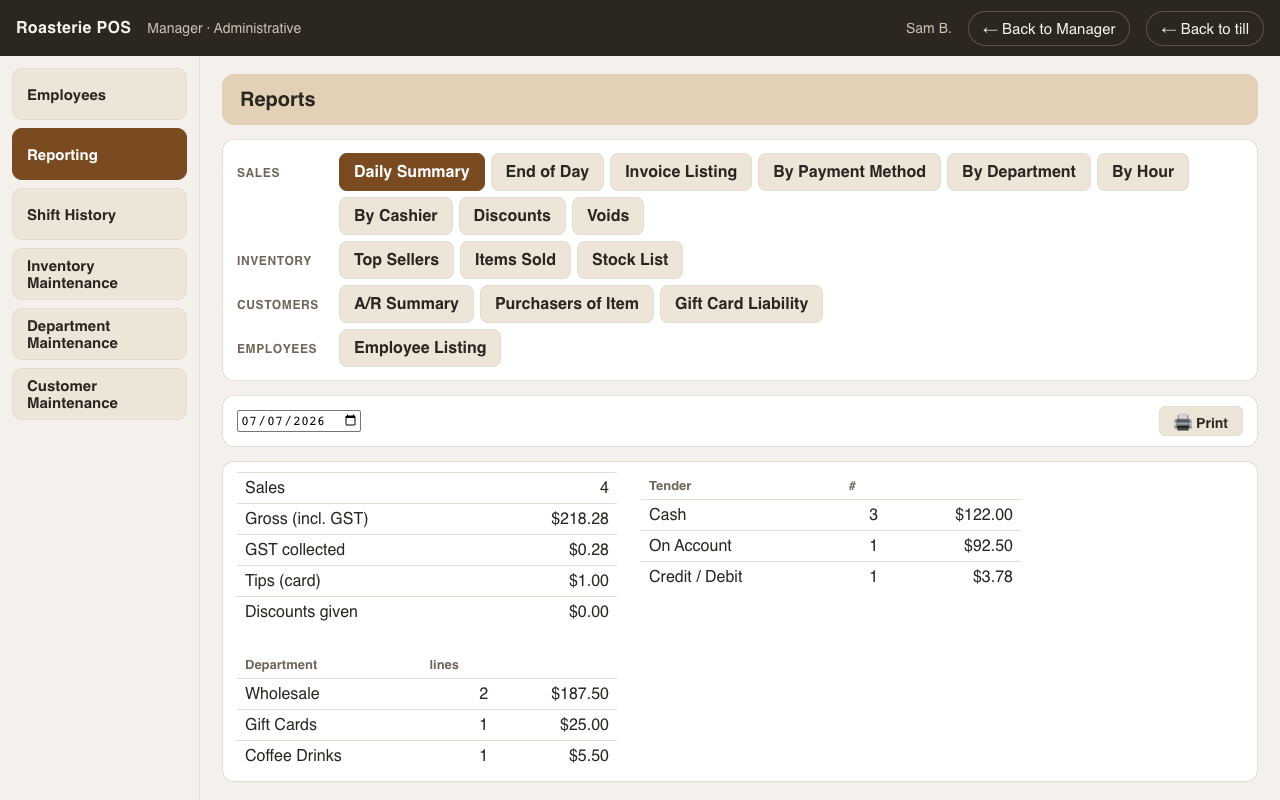
Sales
- Daily Summary — one day's totals: sales, tax, tenders, discounts, voids.
- End of Day — the full closeout: per-tender totals, drawer sessions with over/short, payouts, AR activity, gift-card loads vs redemptions, staff performance.
- Invoice Listing — every sale in the range, one line each.
- By Payment Method — cash vs card vs account vs gift card, with counts.
- By Department — what sold by department, quantities and dollars.
- By Hour — the shape of the day (shop-local time), for staffing decisions.
- By Cashier — per-person sales, and tips.
- Discounts — every applied discount with amount, note, and who applied it (custom discounts also record who authorized, if a swipe was needed).
- Voids — every voided sale with the required reason and names. Loss prevention reads from here.
Inventory
- Top Sellers — the best sellers broken down by category, the top of each department rather than one long mixed list.
- Items Sold — every item with quantity and dollars, over any range.
- Stock List — on-hand for everything with stock tracking on, ready for a count.
Customers
- A/R Summary — every customer with open invoices, bucketed current / 31–60 / 61–90 / 90+ days.
- Purchasers of Item — who buys a given item (search it by name), how much, how often — the "who takes the Ethiopian?" question.
- Gift Card Liability — the sum of outstanding card balances (what you owe the world in coffee).
Employees
- Employee Listing — the staff roster with roles and contact details.